

CALL US TODAY
1-(844)-809-9990

You already know about resolution and NETD. Here is the part almost no one talks about when evaluating a collection of Thermal Weapon Sights (TWS): the processor inside the scope that turns raw infrared light into the picture you actually see through the eyepiece.
Picture this. Two hunters set up on the same Texas pasture with two thermal scopes that look nearly identical on paper. Both run 640×480 sensors. Both claim similar NETD. Both mount comparable objective lens assemblies. Yet one scope reveals a crisp coyote silhouette at 250 yards with visible fur texture and clear separation from the mesquite behind it, while the other shows a mushy, laggy blob that could be a coyote or a warm rock. A 640x480 resolution offers high-definition imaging, so why the dramatic difference?
The answer is the processor and the image-processing pipeline between the sensor and your eye. Sensor resolution sets the ceiling for detail. The processor decides how close you actually get to that ceiling. At Proven Optic, we specialize exclusively in optics, and we have learned that processing performance under real hunting and tactical conditions separates a scope you trust from one that frustrates you in the field.
This guide is for serious hunters, long-range shooters, and law enforcement professionals who already understand the basics but want to know why similar specs deliver wildly different results. If you need a refresher or are just starting your thermal scope journey, the guide overview of thermal scopes will give you a solid foundation.
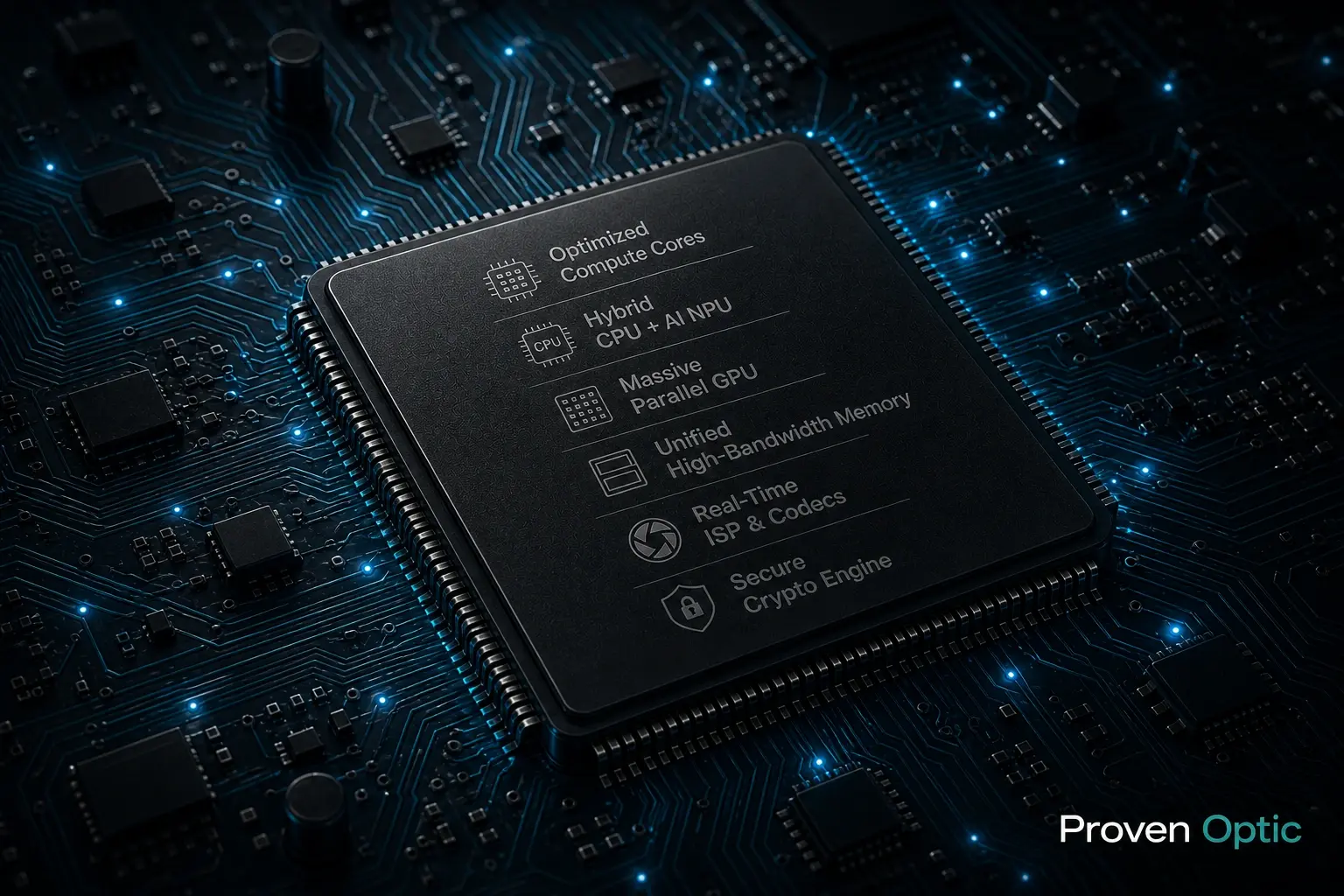
Before we dig into the brain, let's anchor on the specs you already know. These matter, but they are only the starting line.
Sensor resolution is the pixel grid used to capture infrared energy. Thermal scopes typically have resolutions from 256x192 to 640x512. More pixels mean more spatial detail and potentially longer identification range, especially when you need to tell a coyote from a house cat at a distance.
Pixel pitch describes how tightly those pixels are packed on the sensor chip. A 12 µm pixel pitch allows for sharper thermal images and better target definition compared to a larger 17 µm pitch, because each pixel covers a narrower slice of the scene. A smaller pixel pitch pushes your practical detection range farther without increasing lens size.
Noise equivalent temperature difference, or NETD, measures the smallest temperature difference the sensor can resolve. A thermal sensor's sensitivity is measured in milliKelvins (mK), and a lower NETD value indicates better thermal sensitivity. A scope rated at 25 mK will reveal subtle temperature differences between an animal and its surroundings more easily than one rated at 40 mK. But here is the catch: NETD alone does not guarantee a usable picture. A sensor with superb NETD paired with a weak processor can still look washed out or noisy.
Frame rate, typically 30 Hz versus 50 or 60 Hz, determines how smooth the image looks when you pan or track moving targets. Higher frame rates demand more from the processor because it must clean and enhance every single frame before it hits the display screen.
The diameter and focal length of the objective lens set your base magnification and IR light-gathering ability, but lenses alone do not guarantee clean images. Thermal scopes use germanium lenses to transmit infrared light because standard glass blocks the wavelengths thermal sensors need to see.
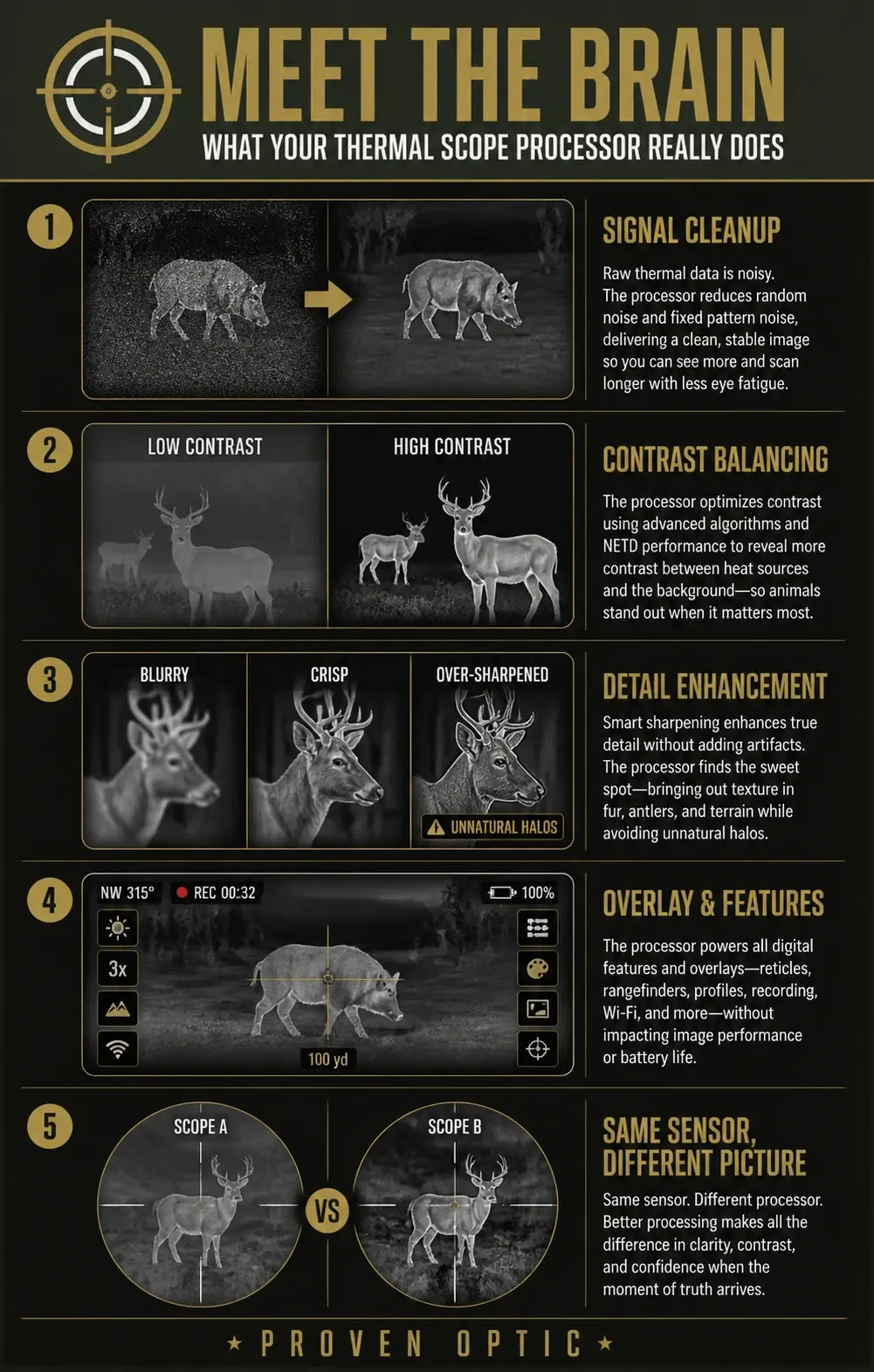
So what sits between the sensor and your eye? A small, dedicated computer, the processor, that works on every frame in real time. Think of it as a full-time video editor living inside the scope, cleaning, adjusting, and enhancing the image 30 to 60 times per second. The processor enhances image quality by correcting noise and contrast before you ever see a pixel.
The processor handles four key jobs that directly shape what you experience in the field:
Signal cleanup. Thermal sensors produce low-contrast images compared to daylight optics, and the raw output is full of random "snow," hot pixels, and cold pixels. The processor scrubs this noise so the image does not sparkle or flicker against the background. Real-time processing speeds prevent lag in tracking moving targets during this cleanup.
Contrast balancing. On a humid summer night, the temperature differences between an animal and the surrounding ground might be tiny. The processor stretches thermal contrast so the animal stands out, making faint heat signatures visible against terrain that is nearly the same temperature.
Detail enhancement. After suppressing noise, the processor sharpens edges around animals, branches, and obstacles. Done well, you see clear outlines. Overdone, the picture takes on an artificial "video game" look, in which fine details disappear.
Overlay and features. Reticles, range data, digital zoom, picture-in-picture, recording, and streaming all run on the processor. It manages all of these without slowing down the core image.
Even two scopes using the same sensor can look completely different because their processors and algorithms handle these tasks differently.
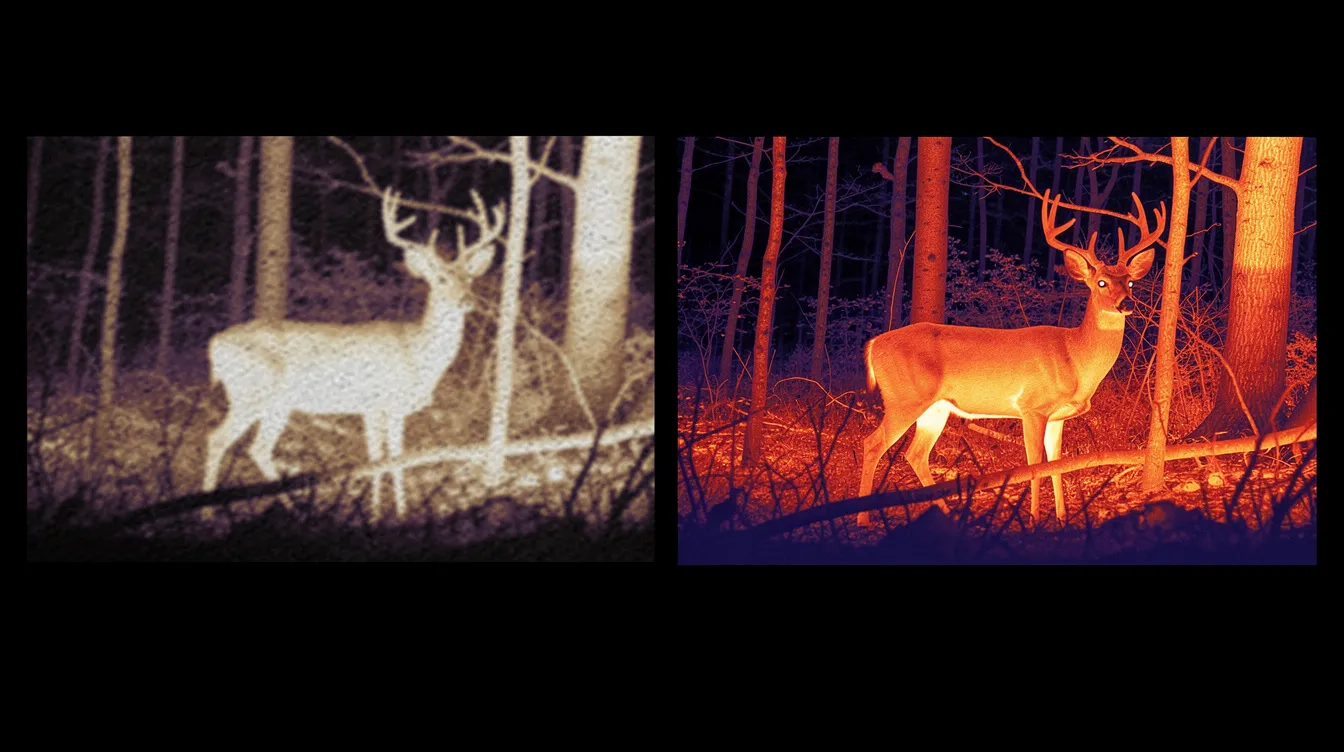
Understanding the processing pipeline helps you see exactly where image quality is made or lost. Here is how your thermal scope turns invisible infrared energy into a visible thermal image, step by step.
Step 1: Capture. The objective lens focuses infrared light onto the sensor. Most thermal scopes use uncooled microbolometer focal plane arrays made from materials like amorphous silicon or vanadium oxide. Microbolometers absorb long-wave infrared (LWIR) light, which heats tiny pixel bridges and changes their electrical resistance. This electrical resistance is what maps the image. Some high-end military systems use cryogenic cooling to further reduce sensor noise, though most hunting-grade thermal imaging devices use uncooled sensors for practical weight and battery-life reasons. Find a deep dive into the explanation of thermal scope lenses for a complete understanding of thermal glass used.
Step 2: Signal conversion. Signal processing includes converting noisy analog signals into clean digital images. The sensor outputs a raw grid of temperature readings, essentially a heat map of the scene, not a picture you can interpret. All those electrical signals represent the IR light/heat energy emitted by every object in front of the lens, but they need serious work before they become useful.
Step 3: Noise correction. The processor applies Non-Uniformity Correction (NUC) to reduce pixel-to-pixel inconsistencies. Two-point calibration corrects both gain and offset variations, while more frequent one-point calibration handles offset drift caused by changes in the sensor's ambient temperature. Bad pixels, those that are stuck hot or cold, get replaced through interpolation. Image optimization includes contrast adjustments using Non-Uniformity Correction, and without it, you would see streaks, blobs, and fixed patterns across the image.
Step 4: Noise filtering. Spatial noise reduction smooths out grain within a single frame, like applying a careful blur that targets noise without erasing edges. Temporal noise reduction blends a few frames together to calm frame-to-frame "sparkle." The trade-off is real: too much temporal filtering smears moving targets and adds lag, which can make a running hog blur into the background.
Step 5: Enhancement and palette. The processor applies contrast stretching and edge enhancement, then maps the processed data onto a color palette. Color palettes like White Hot and Black Hot help users identify heat differentials across the scene. The thermal processor utilizes advanced algorithms for image enhancement and noise reduction at this stage. Finally, reticles, HUD elements, and any zoom overlays are rendered on top.
Step 6: Display. The finished frame is pushed to the OLED (Organic Light-Emitting Diode) or LCOS (Liquid Crystal on Silicon) display at the target refresh rate. Display quality matters here too: even perfect processing can be undermined by a low-resolution eyepiece screen.
The entire chain happens in milliseconds, repeated every frame. Thermal scope processors convert raw data from infrared sensors into high-contrast images, and the quality of each step in this pipeline determines whether you see a clear animal or a confusing blob.
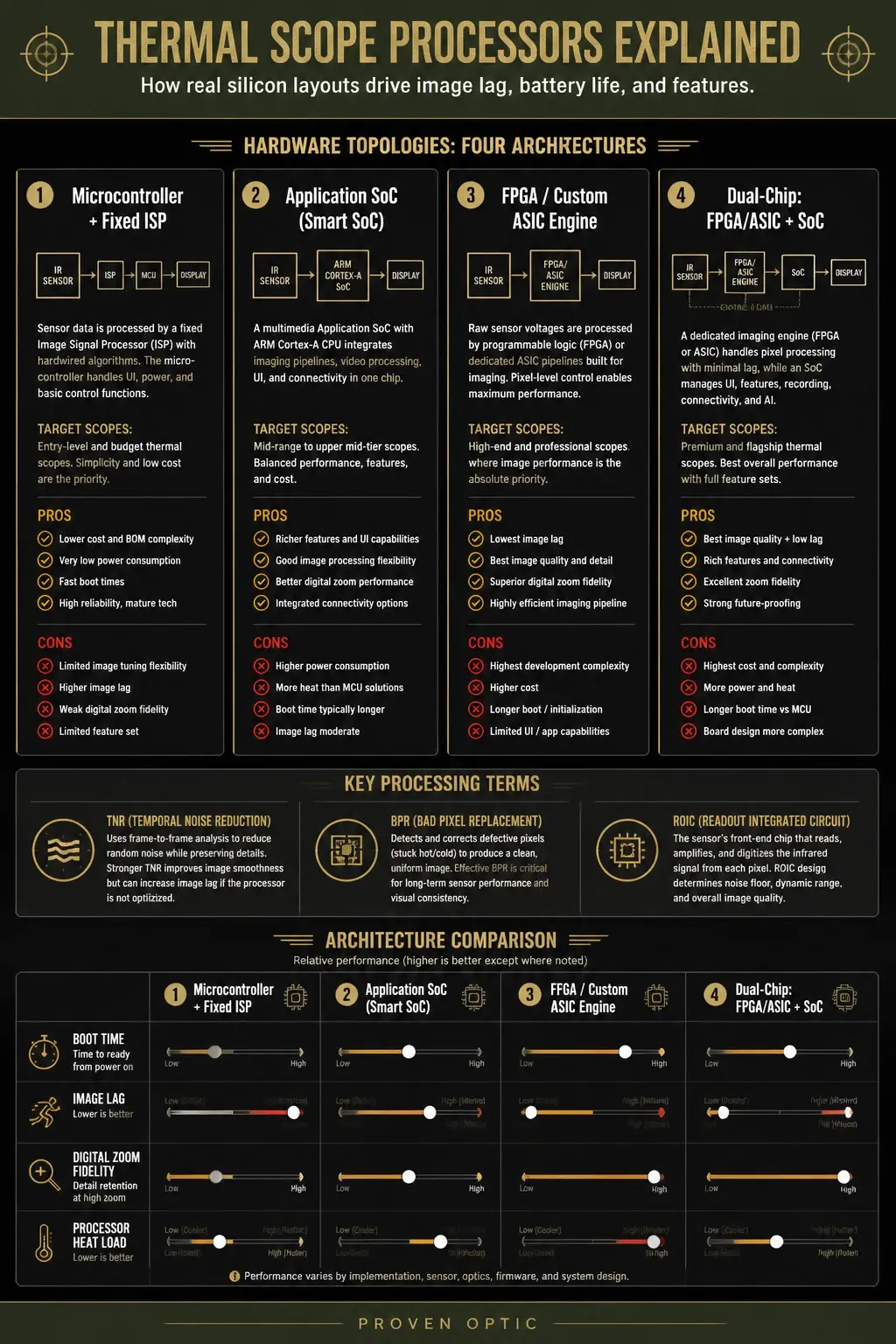
Rather than getting bogged down in complex hardware terms, think of thermal scope processors in four practical tiers based on how they actually perform when you are out in the field. What matters most is the real-world result on your screen.
1. Microcontroller + Fixed ISP (Entry-Level)
This is a simple, budget-friendly setup. It uses a fixed image chip to handle basic picture cleanup. It displays a stable, usable image on your screen with almost zero delay when you turn the unit on.
Instant Boot Time: Ready to shoot the moment you power it on.
Superb Battery Life: Low power consumption means fewer battery swaps.
The Tradeoff: Noticeable image lag when panning, and the picture gets quite grainy when you use digital zoom.
2. Application SoC / Smart SoC (Mid-Range)
This tier uses a multimedia "System on a Chip" (SoC)—similar to a smartphone brain—to handle both the image processing and a heavy software load at the same time.
Feature-Rich: Powers advanced menus, video recording, Wi-Fi streaming, and app connectivity.
Better Zoom: Offers much smoother digital zoom performance than entry-level models.
The Tradeoff: It takes significantly longer to boot up, generates more internal heat, and drains batteries faster.
3. FPGA / Custom ASIC Engine (Professional)
This setup uses a dedicated, highly specialized chip built for one sole purpose: absolute image perfection. It processes raw sensor data at the pixel level to produce depth without software distractions.
Zero Image Lag: Ultra-smooth panning with the lowest latency possible.
Elite Image Quality: Exceptional detail retention and crisp target edges, even at high digital zoom.
The Tradeoff: Because these chips focus purely on the image, scopes in this tier often have basic, limited menus and fewer "smart" features.
4. Dual-Chip: FPGA/ASIC + SoC (Flagship)
This is the ultimate tier found in premium scopes. It combines the raw imaging power of a custom engine with the smart capabilities of a smartphone chip. It gives you the absolute best of both worlds.
Peak Performance: Maximum image clarity, zero lag, and excellent digital zoom fidelity.
Full Feature Suite: Supports AI-driven processing, ballistics, streaming, and rich interfaces.
The Tradeoff: These are the most expensive units on the market, take longer to boot up, and demand the most battery power.
These processor classes directly affect how well your scope handles variations in heat radiation and how effectively it enhances image quality across different environmental conditions, contributing to a longer detection range and sharper target identification.
Although it is imperative to have a properly designed processor, your understanding of the raw data it receives is equally important. Thermal Sensors Explained will give you the understanding you need to match your sensor to the correct processor for your use case.
Spec sheets list sensor resolution, NETD, and detection range. They almost never quantify processing quality. Here are the hidden behaviors that actually shape your experience.
Lag is the delay between your physical movement and the thermal image updating on screen. Heavy temporal noise filtering can add tens of milliseconds of delay. Even with a 50 Hz sensor, aggressive frame blending can make the picture noticeably trail your real vision. Digital stabilization removes motion blur and hand jitter through Electronic Image Stabilization, but this adds its own processing overhead.
Field test: Keep both eyes open and swing across a fence line. If the thermal image noticeably trails your unaided eye, the processor is doing heavy work behind the scenes.
How processors handle fast panning at 50–60 Hz versus lower rates directly influences tracking at night. A scope that drops frames or stutters during a quick swing can cost you a shot on a moving coyote.
Digital zoom functions are enabled through thermal scope processors, and how well the processor preserves detail at 2×, 4×, or 8× magnification reveals a lot about its capability. Unlike optical zoom, which uses physical lens elements, digital zoom is pure software interpolation. On a mid-range 384×288 sensor, a weak processor turns 4× digital zoom into a pixelated mess.
Field test: Aim at a person or deer-sized target at 200 yards. Step digital zoom up one level at a time. Note when fur, clothing seams, or antlers disappear into blur. That is where the processor's limits become visible.
Thermal scope processors need to adapt images to various environmental conditions for clarity. When you swing from an open field to a tree line, or from warm gravel to a cool creek bottom, the processor must adjust gain and contrast without washing out the scene. Poor dynamic handling turns everything flat gray for a moment, exactly when you need to see what is moving in the shadows.
Field test: On a humid evening, observe trees and grass around an animal. Good processors keep bark texture and grass blades visible. Poor ones flatten the scene into a smooth blur.
Law enforcement and security professionals are especially sensitive to lag and over-processing. They must distinguish a gun from a phone or a person from a bush in a fraction of a second, making these hidden processor behaviors mission-critical.
These three terms are often mixed up, but each plays a distinct role in how you interpret thermal images, and the processor influences all of them.
Detection range is the distance where you can see "something is there" as a heat signature. Thermal scopes can detect infrared light up to 2,800 meters (3,062 yards) away under ideal conditions. Detection range varies from 500 to over 2000 yards, depending on the sensor, lens, and environmental conditions. The processor’s ability to enhance contrast and reduce noise directly affects whether a faint warm spot registers against a cluttered background.
Recognition range is the intermediate distance where you can discern the type or category of the object. For example, you might recognize that a heat signature belongs to a coyote rather than a deer. This requires the processor to preserve enough edge detail and thermal contrast to reveal shape and posture without necessarily identifying fine features.
Identification range is the distance at which you can confidently identify species and posture, such as distinguishing a coyote from a dog at 400 yards. This demands the processor maintain sharp edges, avoid over-smoothing, and keep thermal contrast high to reveal subtle details like antlers, tail shape, or weapons.
Here is where processing creates real separation between scopes:
A 640×512 scope with weak processing shows a deer as a bright blob at 800 yards—detected, but not recognized or identified.
A well-processed 384×288 scope like the AGM Varmint V2 with strong contrast algorithms may allow confident recognition of a hog at 300 yards thanks to clear body shape and background detail.
Processors extend usable range by preserving heat contrast in low-delta-T conditions, maintaining edge clarity at moderate digital zoom for long-range shot decisions, and avoiding over-smoothing that hides small but vital details. Thermal scopes allow for long-range detection of heat signatures, but it is the processor that determines whether that detection translates into actionable recognition and identification.
Fast shots, dynamic scanning, and animals that do not hold still. Thermal scopes detect warm-blooded animals in total darkness, when most predator hunting occurs.
Prioritize low lag and smooth refresh over the prettiest still image
Advanced processors keep the image stable during quick pans
Hold recognizable silhouettes at 2–4× digital zoom
Thermal optics excel in tracking wounded game by detecting residual body heat and heat trails left on the ground
You need fine details at higher magnification where digital zoom is unavoidable. Sensor resolution matters, but strong processing to preserve detail at distance matters just as much.
Advanced or smart processors meaningfully extend practical identification range
Look for scopes where 640-class sensors are paired with processors that maintain clarity at 4×+ zoom
They can identify targets through fog, smoke, or dense vegetation when processors handle contrast correctly
Thermal optics can operate in total darkness and adverse weather
Scanning fences, brush lines, and open pasture for hours. They enhance wildlife management by monitoring nocturnal animal activity and protecting livestock from predators moving through light vegetation.
Processors that perform well in mixed backgrounds (fences, vehicles, brush) reduce false positives
Battery life and always-on stability matter more here than peak image quality
Some smart processors offer power-saving modes that throttle refresh rate when scenes are static
This group needs smart-class processors tuned for fast, accurate interpretation: minimal lag, consistent thermal contrast, and clear differentiation of people versus background in urban heat clutter.
Thermal imaging works in total darkness; night vision does not, giving thermal a decisive advantage for complete darkness operations
Thermal scopes detect IR light from heat sources while night vision works by amplifying reflected light, which means thermal optics detect IR light through conditions where ambient light is zero
Thermal scopes can see through fog and smoke; night vision cannot
Night vision provides natural-looking images; thermal shows heat patterns and heat signatures
Thermal scopes excel in detecting camouflaged targets; night vision struggles in these scenarios
Thermal imaging detects infrared light, not visible light.
Eye-safe infrared radiation is used by thermal scopes to detect heat signatures, making them safe for the operator while revealing what visible light and even infrared waves in the near-IR band cannot.
At Proven Optic, our connection to Proven Justice means we receive constant feedback from investigators and officers who rely on these same processing qualities to interpret complex scenes. The processing characteristics that help read an urban environment are the same ones we prioritize when selecting thermal and night-vision optics or serious fieldwork.
More powerful processors and aggressive image processing consume more power, which directly impacts battery life and can generate heat during long sessions. Efficient power management separates well-engineered thermal imaging devices from those that die mid-hunt.
The trade-off is straightforward:
High-end processing with advanced features like video recording, Wi-Fi streaming, and ballistic apps draws more current
Efficient designs balance performance with battery life through optimized code, dynamic power management, and energy efficiency in the chipset architecture
Concrete expectations for most thermal scopes:
Typical hunting-grade scopes deliver 6–8 hours at 50 Hz with moderate processing, extendable with external battery packs
Smart, feature-rich units may drop to 4–6 hours when Wi-Fi streaming and recording are active, so external power is smart for overnight hunts or extended law enforcement operations
When shopping, look for real-world runtime reports rather than lab numbers, USB-C or similar external power support for long range or all-night use, and menu options to reduce refresh rate or display screen brightness when conserving battery life matters. Many thermal scopes now include these power management options, but the quality of implementation varies significantly by processor class.
Not every feature on the spec sheet matters equally. Here are the processor-driven capabilities you will reach for most often.
Color palettes. Processors remap temperature data to visual colors. White Hot, Black Hot, and a high-contrast palette like Red Hot cover roughly 95% of real-world use. The processor's job is to maintain consistent mapping even as scenes shift, so a deer does not suddenly blend into the terrain when you pan from cool sky to warm ground. Each palette produces a different heat map visualization, which can make it easier or harder to detect temperature variations depending on the conditions.
Automatic versus manual gain and contrast. Auto modes adapt to changing scenes and are ideal for scanning. Manual control locks in a consistent picture during a stalk or stakeout where you want the thermal device to hold steady. Good processors offer both with quick switching.
Digital zoom and picture-in-picture. How well the processor preserves fine details in the PIP window while maintaining smooth motion in the main view separates capable scopes from mediocre ones. Digital zoom functions are enabled through thermal scope processors, and the processing quality determines whether zoomed images remain useful for shot decisions.
Reticle rendering. Processors keep reticles sharp and correctly scaled across zoom levels. For a thermal rifle scope used at long range, precise reticle rendering at every magnification is non-negotiable. The lens size and optical path set the base magnification, but the processor manages everything from there.
Advanced processors handle fast switching between palettes, zoom levels, and reticles without hiccups. Pay more attention to real footage of these features than to marketing icons. The way image processing behaves when you switch modes reveals the processor's strengths or weaknesses.
Firmware is the scope's operating software that controls how the processor interprets raw sensor data, manages image processing, and runs features. Think of it as the instruction manual the processor follows. A strong processor running outdated firmware can underperform, while a solid mid-range processor can gain noticeable improvements through good firmware updates.
Firmware updates can improve:
Noise reduction algorithms that keep background detail instead of smearing it
Auto-contrast behavior in fog, rain, and mixed temperature scenes with heat variations
Faster boot times and reduced lag during panning
New reticle options or recording modes without any hardware changes
Better handling of sensor sensitivity adjustments across temperature variations
Before buying, check whether the manufacturer regularly releases firmware updates for their thermal line, how easy it is to install updates (via USB, app, or memory card), and whether changelogs reference image quality and stability improvements rather than just cosmetic menu changes.
At Proven Optic, we favor brands and models with a track record of firmware support because that is how you achieve better image clarity over a 5–10-year ownership window. Thermal imaging technology continues to advance, and the scope that receives meaningful software improvements keeps pace with those advances.
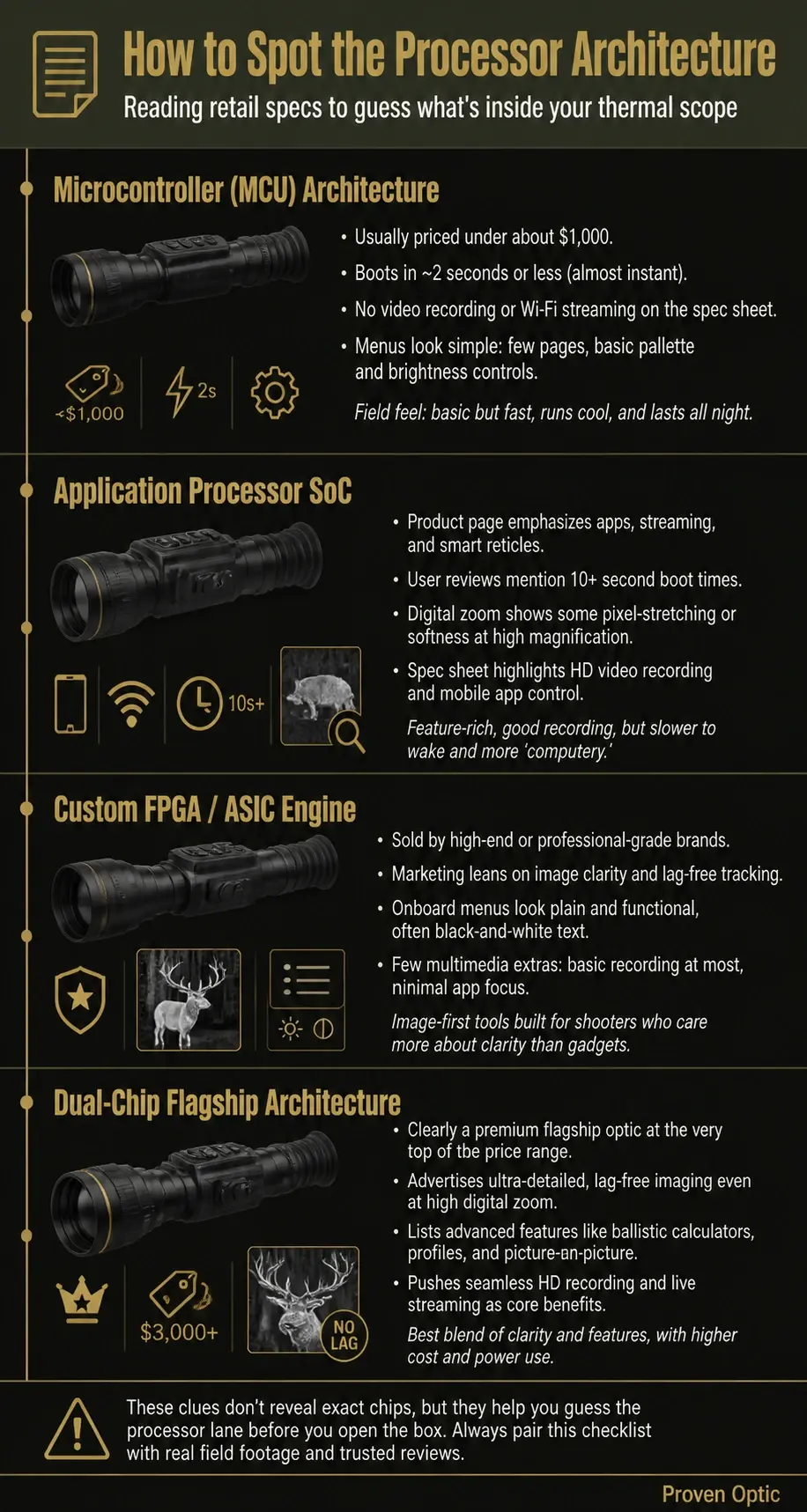
Processor quality rarely appears on a spec sheet. Here is how to evaluate it anyway, whether you are shopping online or testing at a range.
Watch real user footage. Look for videos shot in fog, drizzle, or humid summer nights, not glossy marketing clips filmed in perfect winter conditions with massive temperature differences. Pay attention to how the scope handles scenes where the heat contrast between the target and the background is minimal.
Study panning shots. Footage across tree lines, power poles, and fences reveals lag and motion smoothness. If the image trails, stutters, or smears during movement, the processor is either underpowered or over-filtering.
Compare zoom frames. Look at still frames at 2× and 4× digital zoom for the same scene. How much detail and thermal contrast survive the zoom tells you everything about the processor's interpolation capability.
Ask sellers or manufacturers directly:
"Do you use dedicated image processing hardware, or is everything handled on a basic microcontroller?"
"Can I see sample footage in low thermal contrast conditions?"
"How often do you update firmware, and what image quality improvements have you delivered recently?"
Read field reviews that mention real-world detection and identification range on coyotes, hogs, or human targets at known yardages. Comments about lag, "smearing," or "video-game look" almost always point to overly aggressive or underpowered processing.
We do not just read spec sheets. We evaluate thermal optics in real hunting and law-enforcement conditions before we recommend them.
Our internal evaluation priorities:
Clear image quality at practical hunting distances of 100–400 yards under varied weather and backgrounds
Processor responsiveness and lag when tracking running hogs or scanning a tree line
Stability of identification range when conditions get tough: high humidity, ground haze, or mild temperatures where the animal's body heat barely exceeds the ground temperature
How well thermal scopes in our lineup handle the invisible infrared radiation spectrum across seasons
Our connection to Proven Justice provides us with constant feedback from investigators and officers who rely on thermal imaging to quickly interpret complex urban and rural scenes. That real-world input shapes our curated selection, which leans toward optics with proven processing and firmware support rather than just the highest printed detection range.
If you need help matching a scope to your specific conditions, whether that is hog hunting in Texas brush country or law enforcement perimeter work in the Midwest, our experts are available 24/7.
Use this list before you order your next thermal scope online or walk into a shop:
Confirm sensor resolution and lens size, then ask how the processor preserves detail at 2–4× digital zoom
Look for real footage in bad weather or low-contrast conditions, not just crisp winter promo videos showing maximum heat differences
Pay attention to panning shots: does the image stutter, smear, or trail your movement?
Check reviews for mentions of lag, over-smoothing, or "cartoonish" images that suggest aggressive processing
Verify realistic detection and identification range from field users, not just marketing claims based on ideal conditions
Ask about firmware update history and how image quality has improved over time
Consider battery life claims in light of features you plan to use, including recording, Wi-Fi, and streaming
Match processor level to your mission: fast response for coyotes, maximum clarity and context for law enforcement, balance for general ranch and property use
Test or watch footage of how the scope handles scenes where thermal radiation differences are small, such as warm summer evenings
Evaluate display quality alongside processing: even the best processor cannot overcome a poor eyepiece
Resolution, NETD, and lens specs are only the starting point. The processor and its image processing pipeline are the real brains behind the image quality you see through the eyepiece. Next time you compare two thermal scopes with similar numbers on the box, look past those numbers and ask what the brain inside is actually doing with all that raw data.
Proven Optic can help you interpret this checklist for specific models and budgets. Browse our thermal scope ultimate guide or reach out to our team anytime. We are here to guide you toward the right blend of processing power, image quality, and battery life for your mission, because choosing the right optic is our main goal over just selling you anything.